Contents 13
What to prepare before you start
ChatGPT ads need the same foundations as any paid channel, with a few specifics. The legal entity that advertises and is billed must be based in a country where Ads Manager is available; Ukraine has been on that list since October 2026. Landing pages must be reachable for OpenAI's crawlers, OAI-AdsBot and OAI-SearchBot, or your ads will fail review.
Prepare everything up front so you do not stop halfway through setup waiting for documents or access.
- A registered business and its exact legal name from your documents.
- A card that can be charged in US dollars.
- Your logo and the brand name users will see.
- A site with a measurable action: a lead form, cart, call or sign-up.
- Access to the site code or Google Tag Manager to install the pixel.
- Pages open to OAI-AdsBot and OAI-SearchBot in robots.txt and in bot protection.
- 3–5 square images and 5–10 title and description variants for each offer.
Source: OpenAI Help: Ads Manager Availability (EN) ↗
Source: OpenAI Help: Creating ads for ChatGPT Ads (EN) ↗
Step 1. Create your OpenAI Ads Manager account
Go to ads.openai.com and sign in with the OpenAI account you use for ChatGPT. You can create a first ad from your website URL right away or skip that step and go straight to Ads Manager. We recommend skipping it: you set up billing, the pixel and the schedule first, and no ad starts running before you are ready.
During signup, a single advertiser name fills three fields: Account Name, Brand Name and Legal Name. After the account is created you can edit them separately in Settings → General. The Brand Name appears in ads, while the Legal Name is used for billing and verification. Changing the Brand Name or Legal Name triggers a new review and may pause delivery.
The country, currency and time zone cannot be changed after the account is created, so check them before you confirm. Add teammates in Settings → Users with one of three roles: Admin for full access, Member to create and manage campaigns, Viewer for read-only access. Agencies create a separate ad account for each client and can switch between accounts with one login.
Source: OpenAI Help: Ads Manager Account Setup (EN) ↗
Step 2. Set up billing and pass business verification
Campaigns do not deliver without billing. In Billing, fill in the billing profile — business name, address and invoice email — then add a card. Your bank may show a temporary authorization hold; it is a card check, not a charge, and it is released after verification.
ChatGPT Ads is postpaid: spend accrues, and your card is charged when it reaches the payment threshold. New accounts usually start at $25, and after several successful payments the threshold grows to $50, $100 and beyond. Any remaining balance is charged at the end of the month even below the threshold. Support does not change thresholds manually.
If a charge fails — for example, the card has insufficient funds — your campaigns switch to Not serving. Ads Manager has no retry button, so after topping up the card, email ads-support@openai.com with your ad account ID and the outstanding amount. Business verification runs separately: the legal name must match your documents exactly.
Source: OpenAI Help: Billing & Payment for ChatGPT Ads (EN) ↗
Source: OpenAI Help: Ads Manager Account Setup (EN) ↗
Step 3. Install the pixel and set up conversions
Without measurement you only see impressions and clicks. OpenAI offers two options: the JavaScript Pixel in the browser and the Conversions API on the server, and you can combine them. You can add the pixel directly to your site or through Google Tag Manager, as long as the tag does not block or reorder the calls. Conversion optimization needs at least one supported standard event; custom events are not supported for that objective yet.
ChatGPT automatically appends an oppref parameter to ad clicks. If you send orders from your server, keep that value and pass it with the event, or the conversion will not be attributed to the ad. Conversions appear in reports after 24–48 hours, so do not judge results on day one.
Our own site needed two more steps. First, allow OpenAI's domains in the Content-Security-Policy for the script and event requests. Second, connect the pixel to the cookie banner so it does not track without analytics consent. Check events in the Ads Manager event stream and in the pixel's debug mode before launching campaigns.
| What to track | Standard event | When it fires |
|---|---|---|
| Form lead | lead_created | After a successful form submission |
| Store order | order_created | On the thank-you page after checkout |
| Account sign-up | account_created | After an account is created |
| Micro-actions (Telegram click, call) | Custom event | For reporting; the Conversions objective does not use it |
Source: OpenAI Help: Measure Results (EN) ↗
Source: OpenAI Help: Conversion-optimized Campaigns (EN) ↗
Step 4. Create a campaign: objective, budget, countries
A campaign sets the objective and budget for its ad groups. The objective determines what you pay for, and it cannot be changed after the campaign is created. Most advertisers start with Clicks while the pixel collects data. Once leads come in, create a separate Conversions campaign and choose click billing (oCPC) or impression billing (oCPM). At our launch in Ukraine the actual average cost per click was $0.97, so a $3–5 bid gives headroom rather than setting the price.
The budget is either daily or a campaign total. A daily budget is the average spend over a week that runs Sunday to Saturday: on a single day the system may spend up to twice the daily budget, but no more than seven times it over 7 days. The minimum for a USD account is $25 per day. OpenAI recommends a daily budget for newcomers because it makes delivery easier to monitor. A total budget can be switched to daily, but not back.
Countries are required. New accounts can initially advertise only in their home country — Ukraine for a Ukrainian account. Other countries unlock automatically after identity verification and a certain amount of spend in the home country. You can also choose platforms — Android app, Android web, desktop web, iOS app and iOS web — as well as cities and regions where available.
| Objective | Billing | Bid | Use it for |
|---|---|---|---|
| Views | Per 1,000 impressions (CPM) | Maximum CPM | Reach, brand launch |
| Clicks | Per valid click (CPC) | Maximum CPC, start at $3–5 | Traffic and first data for the pixel |
| Conversions | oCPC per click or oCPM per impressions | Bid Cap, the maximum per conversion | Leads or orders at a stable cost |
Source: OpenAI Help: Creating campaigns for ChatGPT Ads (EN) ↗
Source: OpenAI Help: Conversion-optimized Campaigns (EN) ↗
Source: OpenAI Help: Ads in ChatGPT, the basics for advertisers (EN) ↗
Step 5. Split the campaign into ad groups with context hints
An ad group is where you describe the conversations your offer fits. You do this with context hints: topics, situations, questions and words your customers bring to ChatGPT. They are not exact-match keywords: the system uses them as guidance together with the conversation, your landing page and your ad copy.
Create one ad group per conversation scenario, not per word. For a coffee machine store, that could be choosing a coffee machine for home, comparing automatic and espresso machines, and looking for a gift for a coffee lover. For a service: looking for a contractor, how much it costs, how to do it yourself. Separate groups give cleaner reports, so you can see which scenario brings leads.
- Describe the buyer's situation, not just the product name.
- Add the questions people ask when choosing: price, comparison, requirements, timing.
- Do not mix different products with different landing pages in one group.
- Qualifying advertisers can add negative phrases for brand-specific safety rules.
Source: OpenAI Help: Ads in ChatGPT, the basics for advertisers (EN) ↗
Source: OpenAI Help: Creating campaigns for ChatGPT Ads (EN) ↗
Step 6. Write ads that help people choose
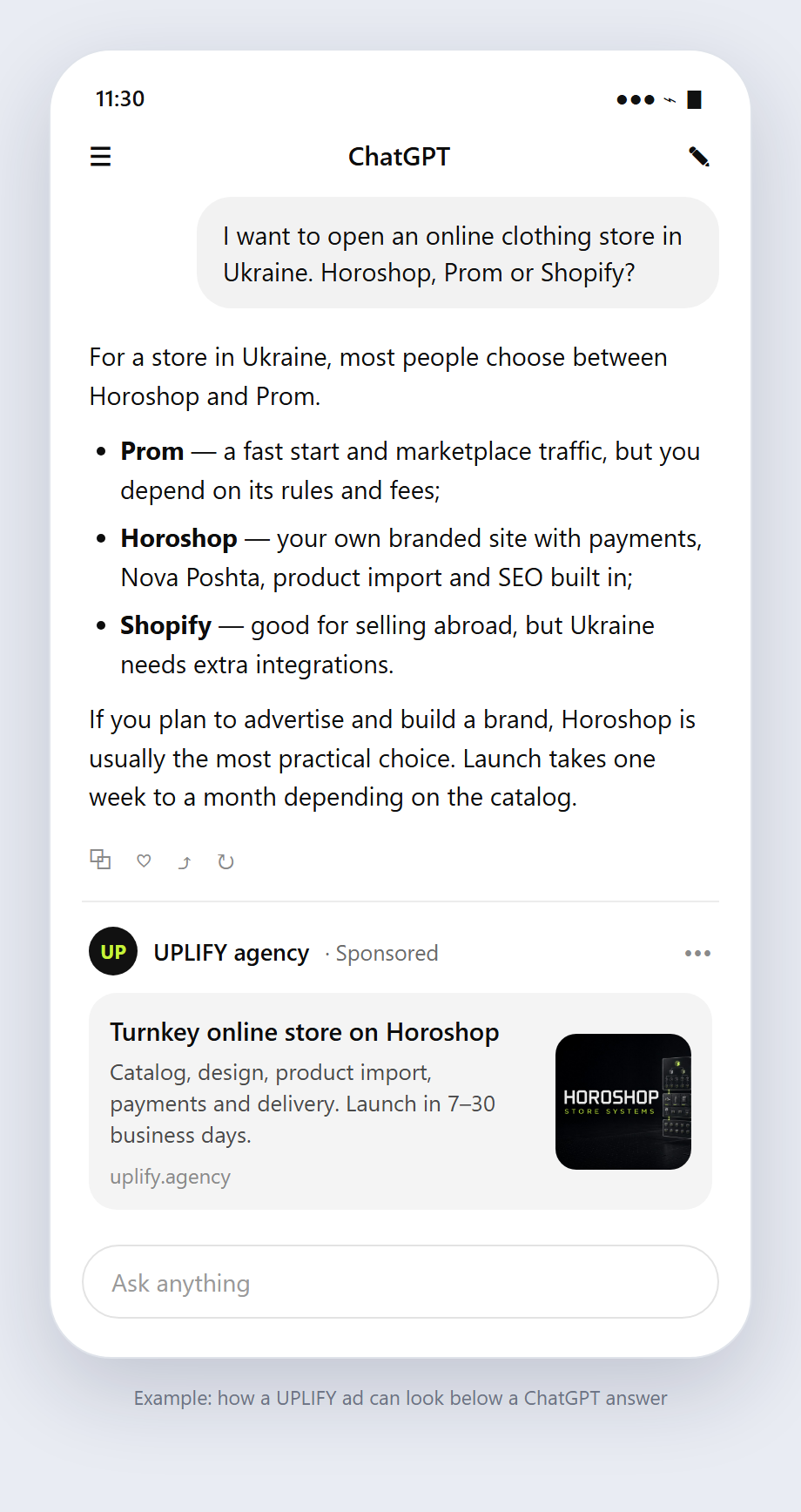
An ad consists of your brand name, logo, title, description, image and link. The single-image format is available to everyone, and since October 26, 2026 an open beta adds a multi-image format with 4–6 square 1:1 images that all lead to one URL. OpenAI recommends specific copy: what you offer, who it helps and in which situation, without generic calls to action.
Create many distinct variants: each title and description should add a new angle rather than repeat the same message. Link to the most relevant page — a product, category or service page, not the homepage. Add UTM tags or the {campaign_id}, {ad_group_id} and {ad_id} macros so you can see the traffic in analytics. Before launch, check the ad enhancements setting: it lets the system change and translate copy and crop images.
- Title: a concrete benefit or the offer name, kept short.
- Description: new information such as starting price, terms, timing, guarantee, who it is for.
- Image: a simple, clear visual without small text.
- Link: the page that matches this exact ad, with UTM tags.
Source: OpenAI Help: Creating ads for ChatGPT Ads (EN) ↗
Source: OpenAI Help: Measure Results (EN) ↗
Step 7. Launch, confirm delivery and optimize
After you publish, ads go through review. If a campaign is active but has no impressions, check in order: account verification and billing are complete, the campaign and ads are active, today falls within the schedule, the ads passed review and your home country is among the targeted locations. Impressions and clicks refresh about every 15 minutes; spend is delayed by 7–8 hours.
Make the first decisions after at least a week and enough volume. Compare ad groups by CTR and cost per click, pause weak ads and add new variants. Once the pixel has collected conversions, create a Conversions campaign: you cannot change the objective of a running campaign, and cloning switches to impression billing. Reconcile Ads Manager data with Google Analytics 4 for the same dates and time zone.
| Symptom | What to check |
|---|---|
| Campaign active, 0 impressions | Billing, business verification, review, dates, home country |
| Impressions but 0 spend | Spend is delayed 7–8 hours; this is normal |
| Clicks but 0 conversions | Campaign event, CSP, cookie consent, oppref, 24–48 hours of processing |
| No eligible targeting country | New accounts advertise only in their home country |
| Everything stopped at once | A failed threshold charge: top up the card and contact support |
Source: OpenAI Help: Measure Results (EN) ↗
Source: OpenAI Help: Creating campaigns for ChatGPT Ads (EN) ↗
Source: OpenAI Help: Billing & Payment for ChatGPT Ads (EN) ↗
Common mistakes when launching ChatGPT ads
Most launch problems come not from the ads but from the setup around them. We collected the mistakes we saw during our own launch and in OpenAI's documentation. Each one either stops delivery or makes reports useless for decisions.
- Publishing a campaign during signup and getting impressions before the pixel and schedule are ready.
- Leaving automatic copy enhancements on and ending up with unapproved wording.
- Choosing the Conversions objective without a standard pixel event.
- Blocking OAI-AdsBot through robots.txt or bot protection, so ads fail review.
- Expecting conversions on day one: attribution takes 24–48 hours.
- Putting every product in one ad group, so reports cannot show what works.
- Ignoring the card: a failed charge stops every campaign.
Where to start
Launching ChatGPT ads takes seven steps, but preparation and measurement decide the outcome: a verified business, working billing, a pixel with a standard event and separate ad groups for each conversation scenario. Start with a Clicks campaign and move to Conversions after the first leads. If you want to skip weeks of trial and error, UPLIFY launches ChatGPT ads for you end to end.
Questions about launching ChatGPT ads
How long does it take to launch ChatGPT ads?
Creating the account and a first campaign takes an hour or two. Business verification, pixel setup and ad review take longer, usually from one day to a few days. If your site uses a Content-Security-Policy or a cookie banner, plan time for technical changes. After launch, conversions appear in reports within 24–48 hours. Launches go fastest when documents, a card and site access are ready in advance.
What is the minimum budget for ChatGPT ads?
For a USD account the minimum daily budget is $25 per campaign, roughly $750 per month. The daily budget is spread across the week, so a single day can reach twice the daily amount. Every additional campaign needs its own budget, so plan at least $50 per day for two offers. Budget separately for agency fees if a partner manages the campaigns for you.
Can I run ChatGPT ads without a pixel?
Technically yes: Views and Clicks campaigns run without conversion measurement. But then you only see impressions and clicks and do not know your cost per lead. The Conversions objective is not available without the pixel or the Conversions API. We recommend installing the pixel before launch so you collect optimization data from day one. On a simple site the pixel takes about an hour.
Why is my campaign active but not serving?
The most common reasons are incomplete billing or business verification, ads still in review, a start date in the future, or no home country among the targeted locations. New accounts can initially advertise only in their home country. If every campaign stopped at once, check whether a threshold charge failed. After topping up the card, contact OpenAI support with your ad account ID.
Can an agency run ChatGPT ads for a client?
Yes. OpenAI asks for a separate ad account for each advertiser, and the agency is invited with the Admin or Member role. The legal name and billing stay with the client, so the ad budget is charged to the client's card. UPLIFY works exactly this way: we set up the account, pixel and campaigns, and the client sees all the data. Agency access can be removed at any time in Settings → Users.
Sources and verification date
OpenAI documentation and copy checked on October 27, 2026.
- OpenAI Help: Ads Manager Availability (EN)
- OpenAI Help: Ads in ChatGPT, the basics for advertisers (EN)
- OpenAI Help: Billing & Payment for ChatGPT Ads (EN)
- OpenAI Help: Creating campaigns for ChatGPT Ads (EN)
- OpenAI Help: Conversion-optimized Campaigns (EN)
- OpenAI Help: Creating ads for ChatGPT Ads (EN)
- OpenAI Help: Measure Results (EN)
- OpenAI Help: Ads Manager Account Setup (EN)