Black Friday at UPLIFY: 25% off all one-time services through December 1

UPLIFY’s business process automation services cover workflow review, AI integration, connections between existing tools, and custom development where needed. We test on your examples, launch the agreed workflow, then hand access and instructions to your team.

UPLIFYBusiness process automation

What still gets done by hand in your business?

By morning, someone is looking for a lead in a chat thread. By evening, you’re still checking the numbers in Excel. Tell us what takes time from your team. We’ll work through it with you and handle the implementation.

Does this sound like your team?

Sales

“Which leads still need a reply?”

A customer sends an Instagram DM, then leaves their number on your site. You ask the team chat whether anyone has got back to them.

Put enquiries in one queue. The team can see who owns each lead and which customers are still waiting.
Reporting

“I can see revenue. What did we keep?”

Sales are in your CRM, costs are in Excel, and fees and returns are in other reports. You only see the margin once somebody pulls the numbers together at month-end.

Build a report around the costs you’ve agreed to track. It shows the margin and flags data that hasn’t come through yet.

Catalogue

“Who’s doing the product listings tonight?”

A supplier sends a price list. You copy the prices and specs one by one. Next week there’s another file and the whole job starts again.

Prepare the listings and updates in batches. Someone on your team checks fields where data is missing or sources disagree.

Orders

“We enter the same order three times”

Someone copies the address from the store into accounting, then into the shipping portal. After dispatch, they still have to find the tracking number and send it to the customer.

Connect the store, accounting and shipping. If an address needs checking, the order is flagged for the team.

Where do you start when several things need fixing?

Show us a lead, order or report your team actually handles. We’ll follow it with you: who picks it up, where they copy the data and which step makes them wait.

We’ll suggest the first change, the systems it involves and what to compare after launch. If one example doesn’t give us enough to go on, we’ll agree the scope of an audit.

Example: reviewing lead intake
Today
A sales rep opens the website notification and types the contact details into the CRM.
Change
When a customer submits the form, the CRM records the lead and assigns a task.
Exception
Enquiries with missing contact details go to a person for review.
Measure
Compare how many leads reached the CRM and how long customers waited for a reply.

One workflow or a system of your own

UPLIFY’s business process automation services cover workflow review, AI integration, connections between existing tools, and custom development where needed. We test on your examples, launch the agreed workflow, then hand access and instructions to your team.

Automate one workflow

Start with a job the team repeats every week. We’ll connect the tools you already use and agree how to check the result before we begin.

Build a custom system

If sales, fulfilment and accounts each use different tools, a shared portal can give every team a clear view of its tasks and approvals. We can build that around the way you work.

What you can automate

We use rules to move structured data between systems. AI can help read a supplier email, extract fields from an invoice or draft a reply. Your team checks exceptions.

Ecommerce automation services. Turn a supplier file into draft listings. Your team checks the listings before import. We then generate product feeds for Google and Meta from the updated catalogue.

Custom AI agent development. A store’s chatbot can look up items in its connected catalogue. It hands questions that need a person to the team. Before launch, we test those replies and handoffs on your examples.

What we’ve already built

Inside UPLIFY

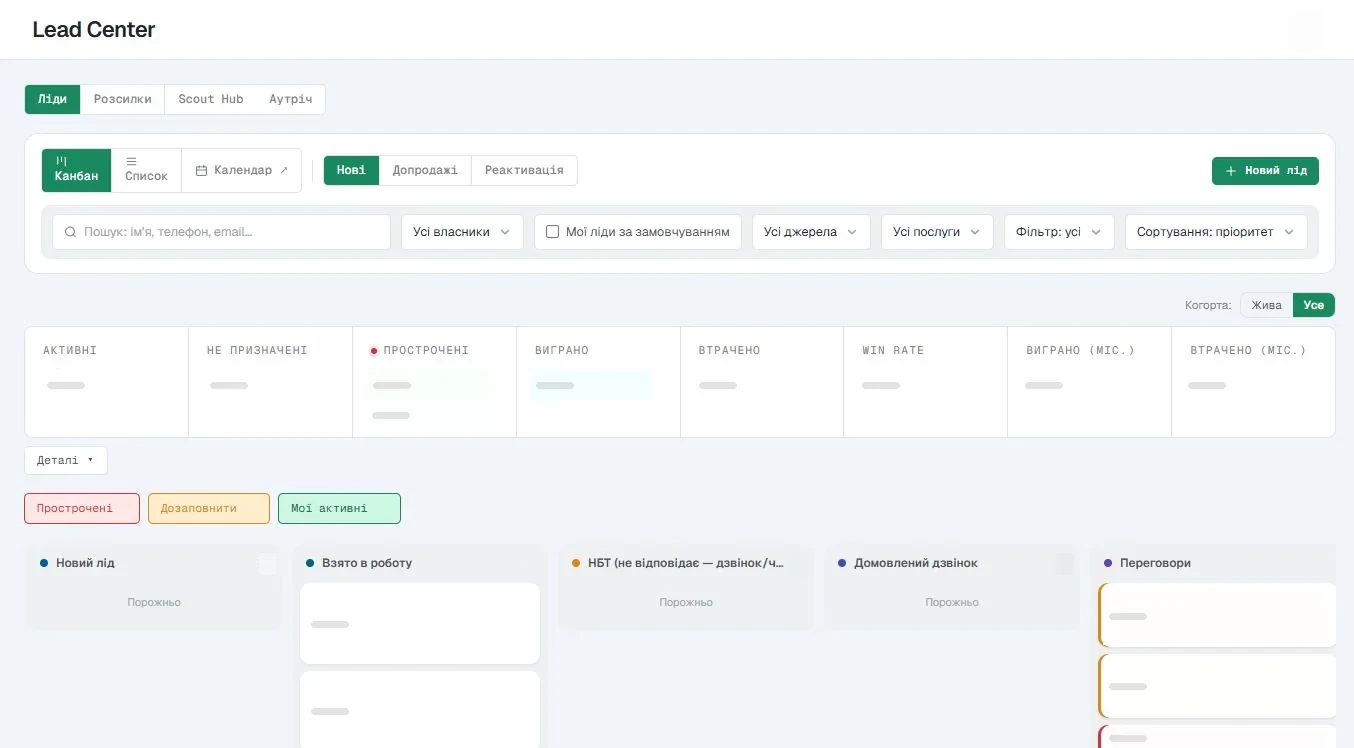
UPLIFY OS · from enquiry to owner

An enquiry from our website goes into Lead Center, and the team gets a Telegram message. We use the same system to check project data. Nestor helps us review changes in the numbers. A specialist approves material changes.

Working Lead Center in UPLIFY OS. Client details and internal figures are redacted.

Client workflow

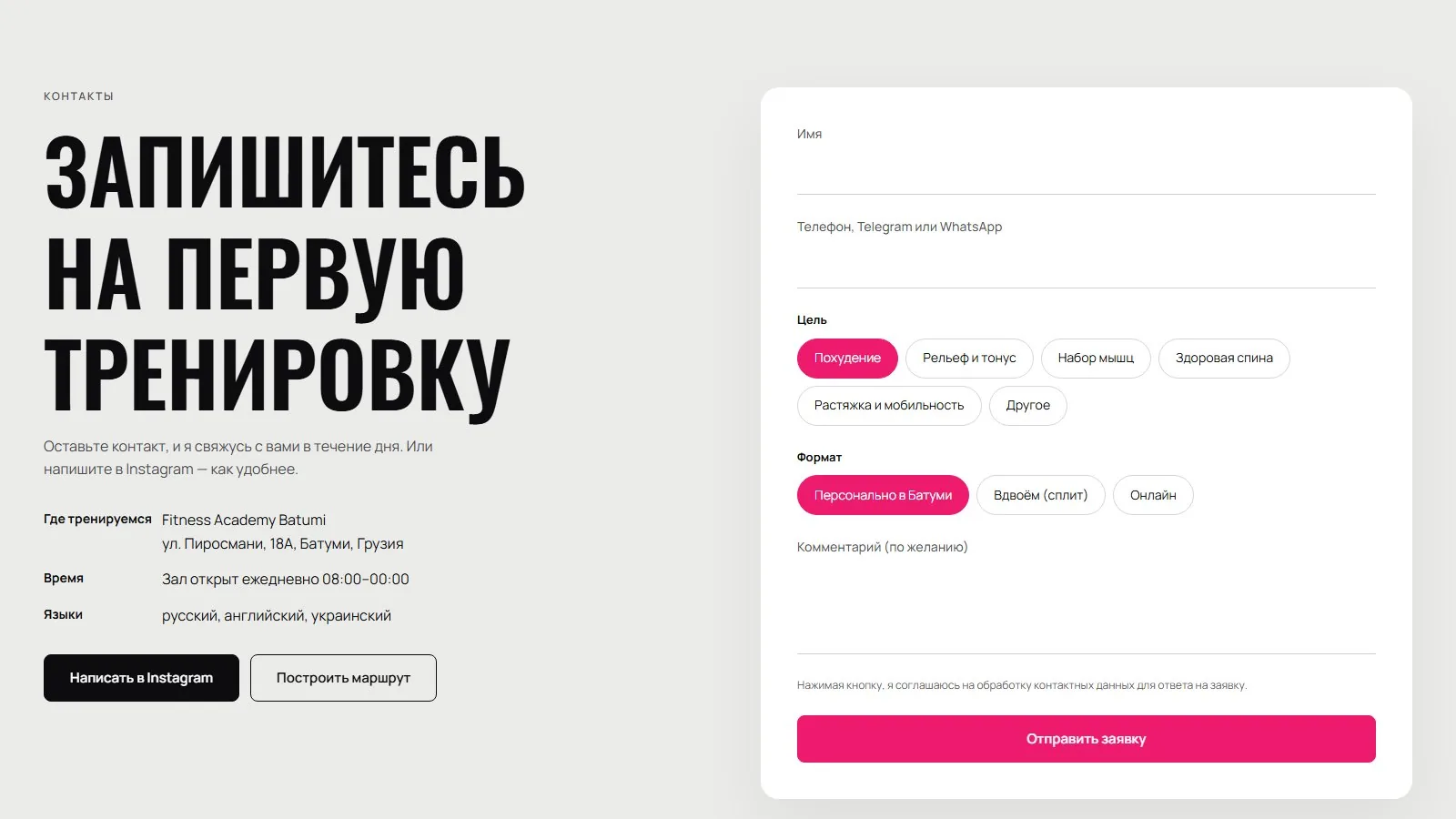
Overkovskaya · enquiries into Telegram

A client leaves contact details, their goal and preferred training format on the site. The trainer gets one Telegram message with all three. GA4 records the successful form submission.

Training enquiry form on the Overkovskaya website

Custom system

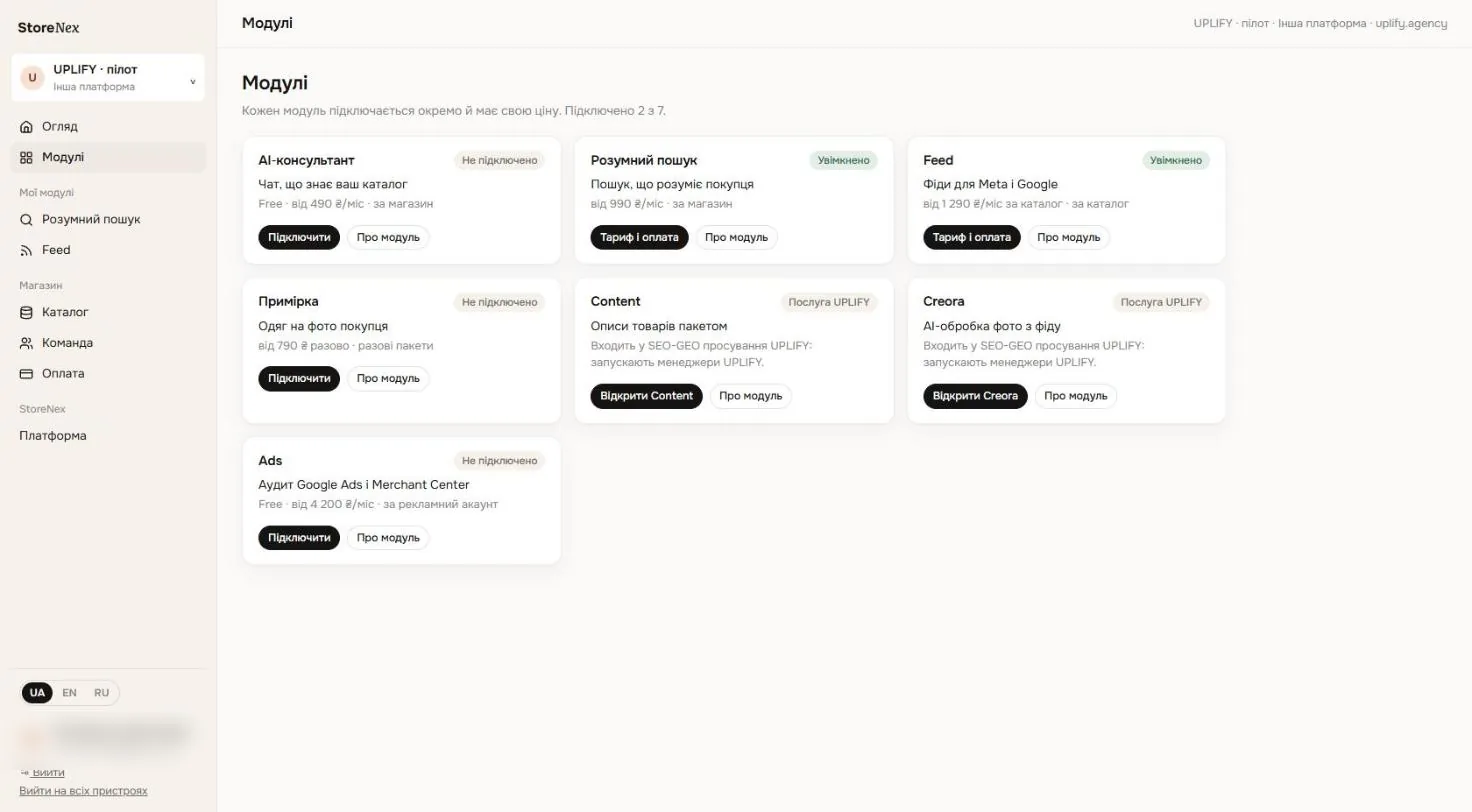
StoreNex · seven modules in one account

We brought separate tools onto one platform. Users now sign in with Google and pay for modules in one account. We reconciled balances during the account migration and built a three-language site with demo access.

StoreNex account showing seven modules

“Now it takes five minutes.”

BabyShop on filling in product listings. Doing it by hand used to keep them working until midnight.

Questions before you start

When do I need an automation audit?

An audit helps when several workflows are slow and you’re unsure which to fix first. When the task is clear, such as sending website enquiries to your CRM, we can discuss what it takes to launch it.

How much does business automation cost?

It depends on how many systems we need to connect and what needs building. Before work starts, we quote the implementation and show paid tools and agreed support separately.

How do we test a custom system?

Your team runs through familiar work in a test environment. Someone creates a request, another person approves it, and we check that data and permissions behave as agreed. We then hand over the agreed materials and access.

Do we need to replace our CRM?

We check what your CRM can receive and send. If it covers what the workflow needs, we connect it to the rest of your tools.

Can you build an AI agent for one task?

Yes. We agree which sources it can read, what actions it can take and when it needs to hand work to your team. We test that behaviour on your examples before launch.

How do we tell if automation helped?

We agree what to measure up front. For product listings, that could be time per batch and how many manual fixes it takes. After launch, we compare the same measures on a similar batch.

Let’s find a place to start

Tell us where the work gets stuck, in your own words. One example from a normal day is enough to start.

Add details (optional)

By sending your request, you agree to the processing of personal data.

Telegram →Message us on WhatsApp

Reply within one business day · no spam · no obligation